

Data curation
for computer vision.
Find the data worth labeling and the labels worth fixing, before training. Supervisely keeps images, videos, point clouds and medical volumes in one place, searches them by meaning, shows the images behind every number and versions each state a model learns from.
All your data in one place, in the format it already has.
Import detects the annotation format and builds the project. Data that lives in a bucket stays there, and projects from other labeling tools come over with their labels.
| Images |
|
|---|---|
| Videos |
|
| Point clouds |
|
| Medical |
|
| Meshes |
|
Supervisely JSON for every type of data, with nothing lost. All formats
Your buckets, by link
Add files from AWS S3, Google Cloud Storage or Azure as links: nothing is copied, large datasets import almost at once, and the files stay in your bucket.
Import from cloud storageMove over from another tool
Migration tools copy projects from CVAT and V7, as well as Roboflow and Labelbox, and convert their labels and tags on the way.
Migration guidesTake it out the same way
Export to COCO, YOLO, Pascal VOC, DOTA, KITTI 3D or nuScenes, or straight back to your bucket.
Export options
Search a whole project by meaning.
AI Search ranks every image of a project against a text prompt or an example, so you find edge cases and rare scenes in minutes instead of scrolling through thousands of files.
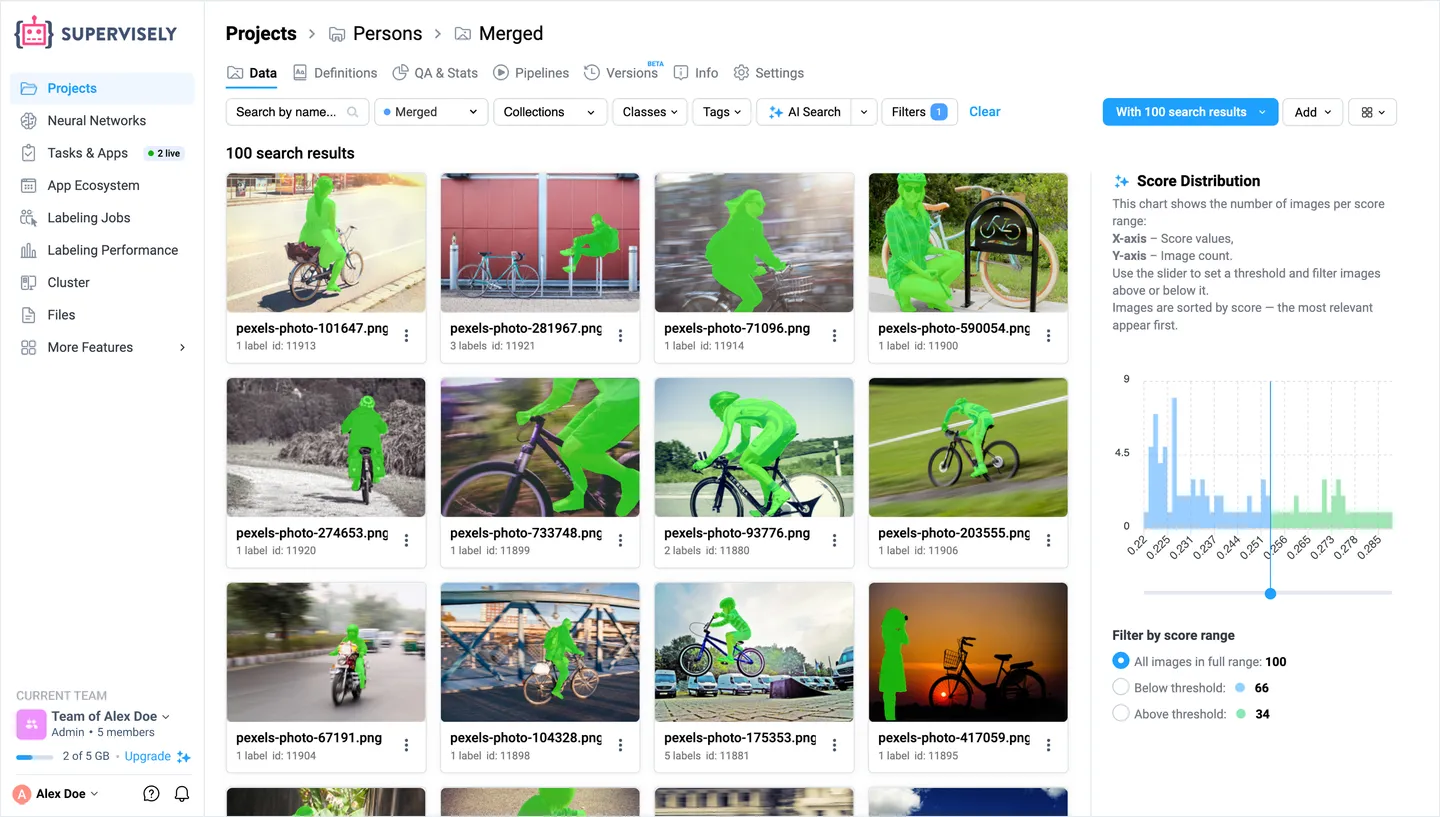
By text or by example
Type what you need or pick one or several images, and a score chart sets how close a match has to be.
A diverse sample, no prompt needed
Get a varied, representative slice of the project: the right start for the next labeling round.
Filters and collections
Stack AI Search with classes, tags, object sizes and authors, then save the result as a collection for a labeling queue or a training split.
AI Search runs on CLIP embeddings that update automatically and never leave your environment.
Catch label errors before a model learns them.
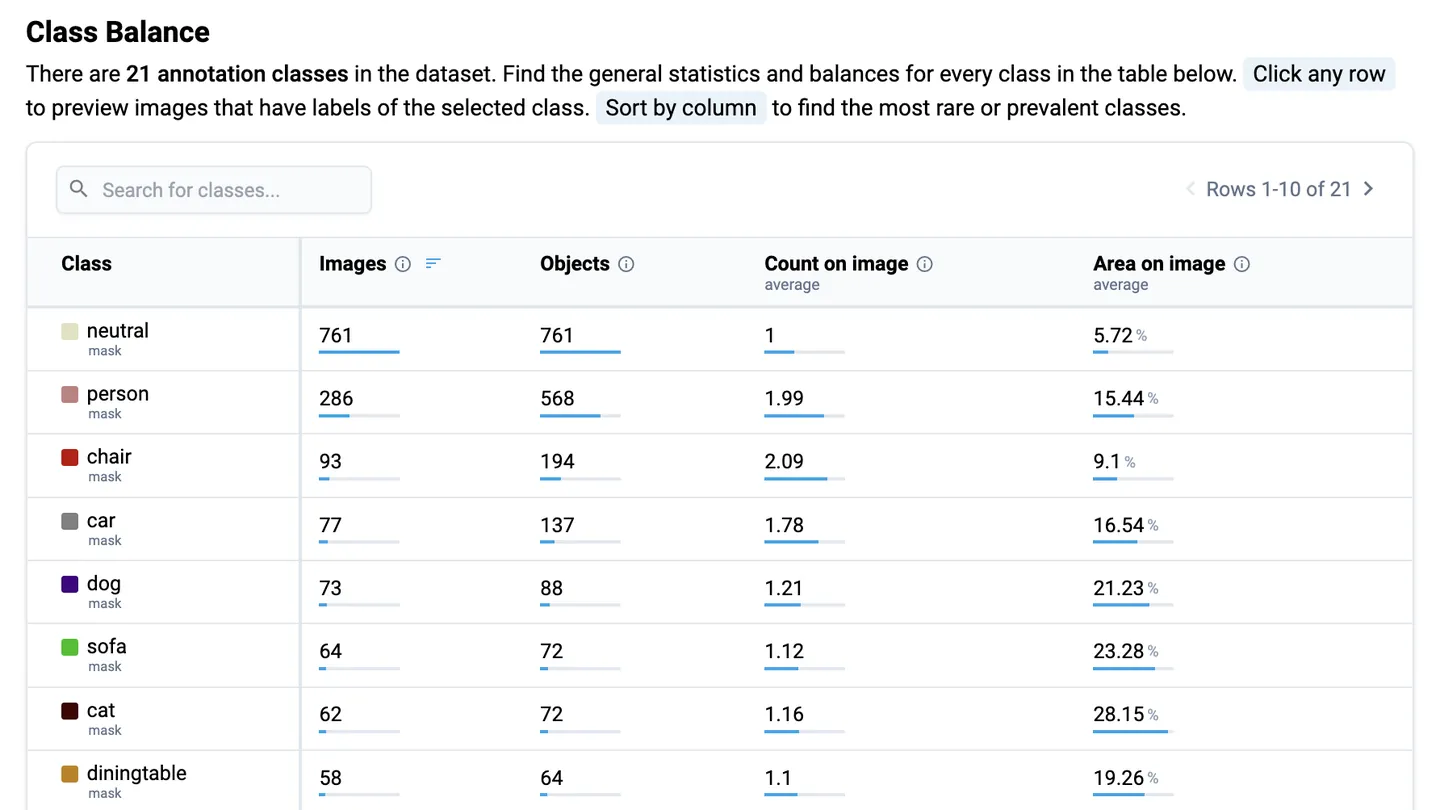
A missing class, a mislabeled object or a suspicious count shows up in the project statistics first. Every number opens the images behind it, so you fix the data, not guess at the model.
Statistics that open the images
Class balance, class co-occurrence, object sizes and where objects sit in the frame. Unusual pairs, counts or sizes point to wrong labels, and a click shows them.
Find the same mistake everywhere
Found one bad label? Search for similar images by example, or filter for objects that lack a tag or are suspiciously small.
Model errors lead back to the data
The model evaluation report opens the images behind every false positive and missed object, and some of them turn out to be labels to fix.
Know exactly which data trained which model.
Versions save the state of an image or video project, so every experiment can be traced back to its data and repeated.
Open any version instantly
Look inside a version read-only, with the labeling tool, AI Search and filters, or restore it as a new project to branch an experiment.
Compare two versions
Pick two versions and see what changed between them, before you train on the newer one.
Saved before every training run
Training saves a version of the data before it starts, so the data a model learned from is always there to go back to.
Augment, convert and split in one visual pipeline.
Connect a project to transform nodes, preview every step on a real image, and save the result as a new project. Save the pipeline as a preset and run it on the next batch.
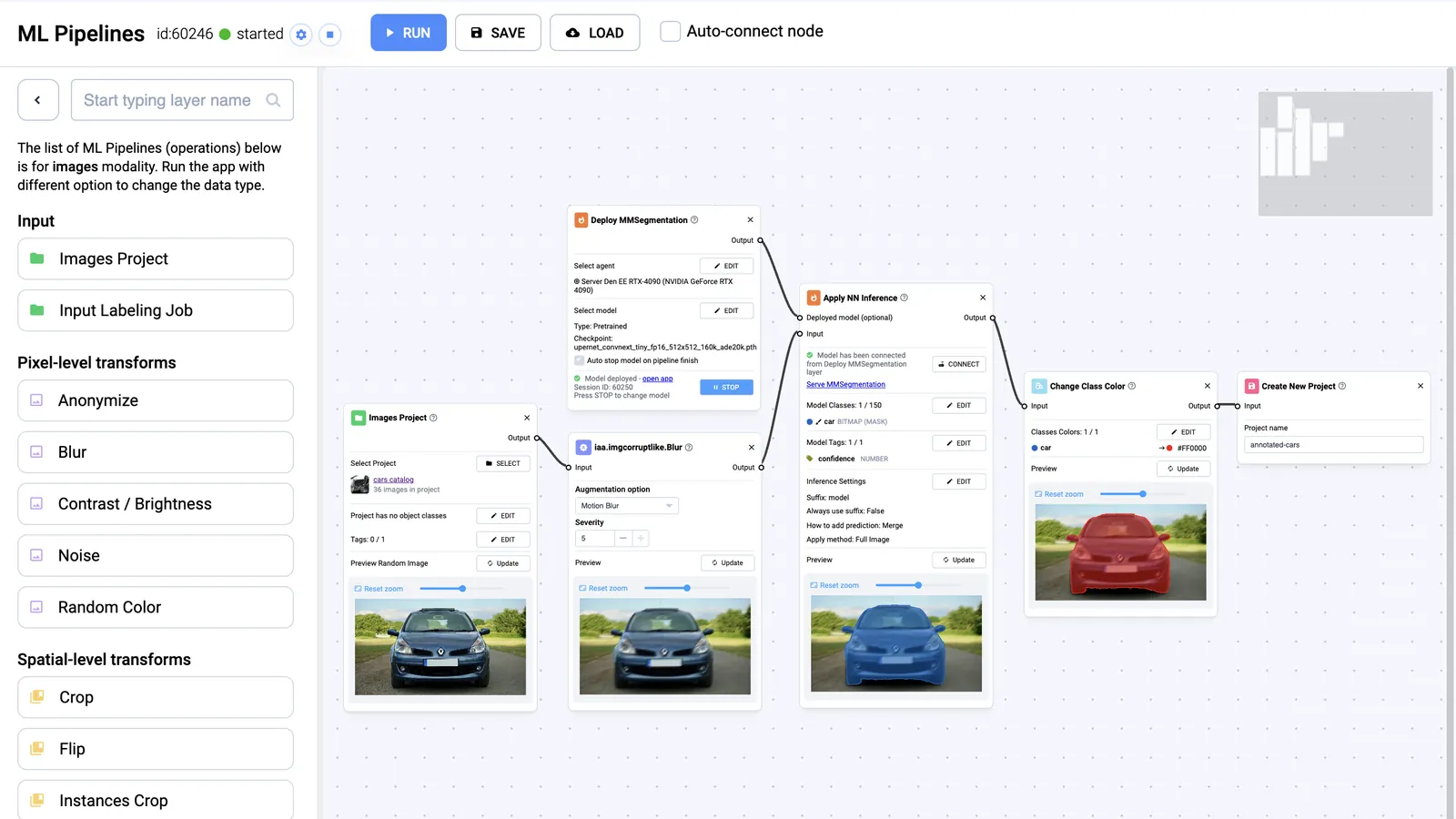
Augment
Crop, flip, rotate, blur, noise, color and more than 100 ImgAug augmenters, applied to a share of the data. Labels move with the pixels.
Convert
Masks to polygons, masks and polygons to boxes, rasterized or skeletonized objects, merged or renamed classes, and blurred or pixelated objects for anonymization.
Split and route
Split train and validation sets by percent, class or tag, route images by condition, and run a deployed model inside the pipeline.
Frequently asked questions.
Which annotation formats can I import and export?
Import detects COCO, YOLO, Pascal VOC, Cityscapes, LabelMe, Label Studio and PNG masks for images; KITTI 3D, KITTI-360, SemanticKITTI, nuScenes and Lyft for point clouds; DICOM, NRRD and NIfTI for medical volumes; and Supervisely JSON for every type of data. Export writes COCO, YOLO, Pascal VOC, DOTA, segmentation masks, KITTI 3D and nuScenes, among others. See the full list of supported formats.
Can I use data in AWS S3, Google Cloud Storage or Azure without uploading it?
Yes, with Enterprise Edition. Add files to a dataset by link and Supervisely stores only the links: the files stay in your bucket and load from it when someone opens them. You can also copy files in, or keep all of the platform’s storage in your own bucket. See import from cloud storage.
How do I migrate from CVAT, V7, Roboflow or Labelbox?
Run the migration tool for your old platform, connect it to your account and select the projects to copy. It converts labels and tags and links every source project to its new Supervisely project. Archives already exported from CVAT or V7 also import directly. See the migration guides.
How does AI Search find images?
AI Search computes a CLIP embedding for every image in a project and finds images by meaning: from a text prompt, from one or several example images, or as a diverse sample of the whole project. Embeddings update automatically and stay in your environment. See how AI Search works.
Does Supervisely have dataset version control?
Yes. Versions save the state of image and video projects, open as read-only previews without a restore, compare with each other and restore as new projects. Training saves a version of an image project before it starts, so you always know which data a model learned from. See project versions.