
ViTPose Tutorial: Run ViTPose and Auto-Label Poses in Supervisely
 Max KolomeychenkoUpdated
ViTPose explained and step by step: deploy pretrained ViTPose checkpoints for humans and animals, pre-label keypoints, and run it with YOLOv8 on a full dataset.
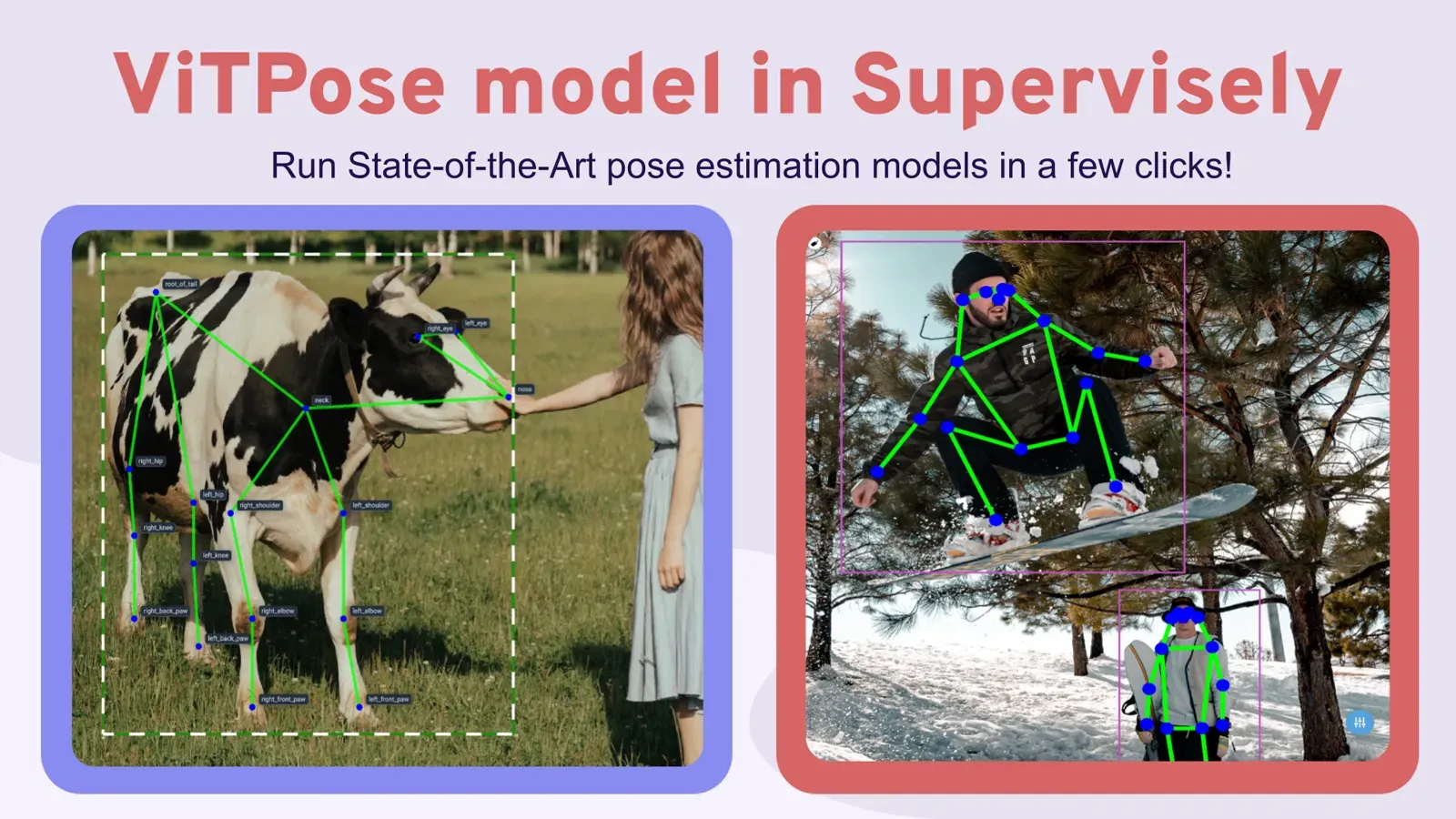
ViTPose is a pose estimation model that predicts body keypoints with a plain vision transformer. It reaches 81.1 AP on COCO test-dev and has checkpoints for humans and four-legged animals. This tutorial shows how to deploy ViTPose in Supervisely and use it to pre-label pose skeletons in your own image datasets.
New to the topic? Start with our guide to pose estimation models for how ViTPose compares with OpenPose, HRNet and RTMPose. For animals, see the animal pose estimation guide.
What you need
- A Supervisely account. The free Community Edition works.
- A computer with a GPU connected to your account.
- Images with people or animals, or your own custom dataset.
How to use ViTPose in Supervisely: video and steps
In this step-by-step video guide, we demonstrate how to:
-
Create a custom keypoint skeleton template
-
Manually annotate body poses on images with the defined skeleton template in Supervisely Labeling Toolbox
-
Run Serve VitPose Supervisely App to deploy pre-trained publicly available ViTPose model in a few clicks. In the demo, we utilized a checkpoint for animal pose detection and estimation, but you have the flexibility to choose any model checkpoint for the human pose estimation task if needed.
-
Get model predictions and perform model-assisted annotation to speed up manual labeling of cow body poses.
-
Use ViTPose in combination with YOLOv8 object detection model to label all images at once in your dataset automatically.
What is pose estimation?
Pose estimation is a computer vision task of localizing and classifying anatomical body keypoints (joints) in images or videos. The full overview is in our pose estimation models guide.
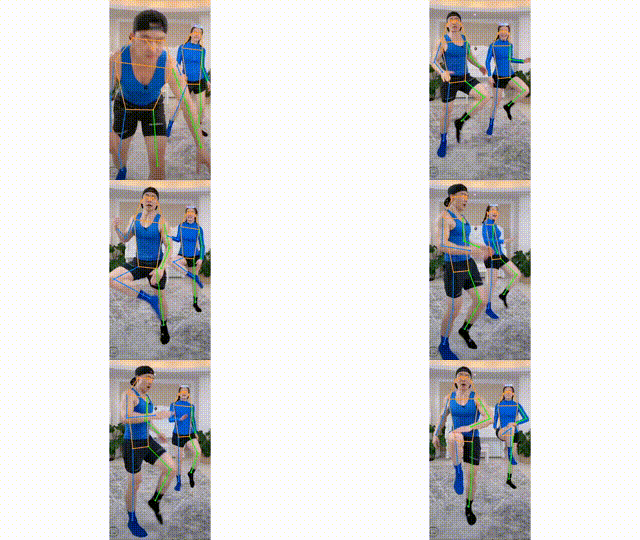

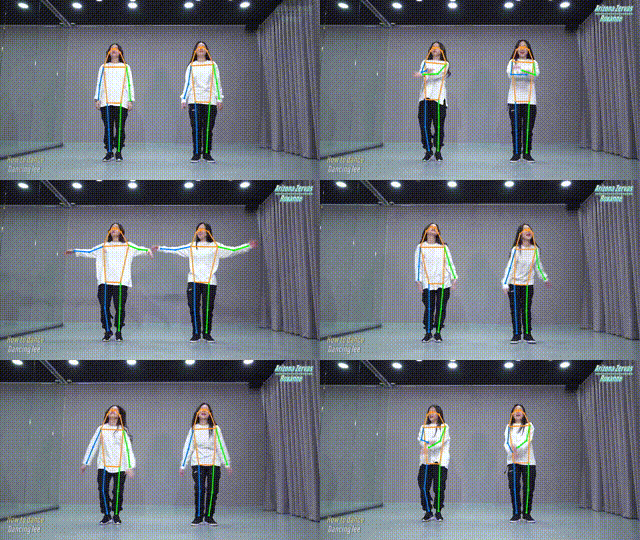
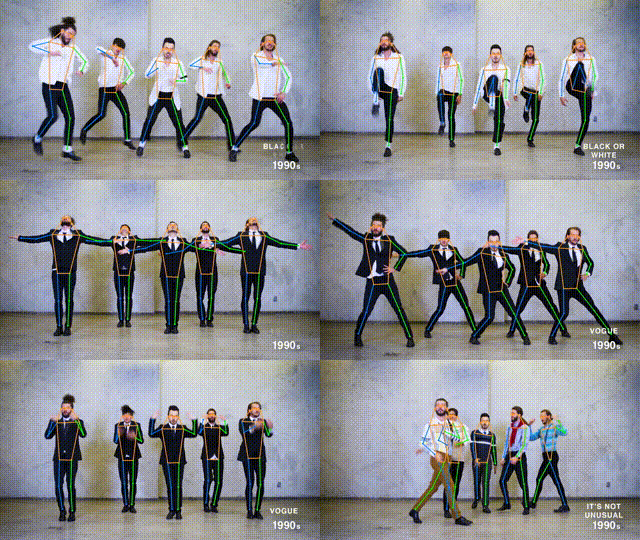
What is ViTPose and how accurate is it?
ViTPose is a neural network designed for general body pose estimation in computer vision tasks. To make the most of this model, simply ensure you provide it with the bounding boxes centered around the objects of interest. You can either put the bounding boxes manually or use an object detection model for this purpose. It's worth noting that ViTPose reports 81.1 AP on the COCO test-dev set in the ViTPose paper, a new state of the art at publication, as shown on paperswithcode (click image to zoom).
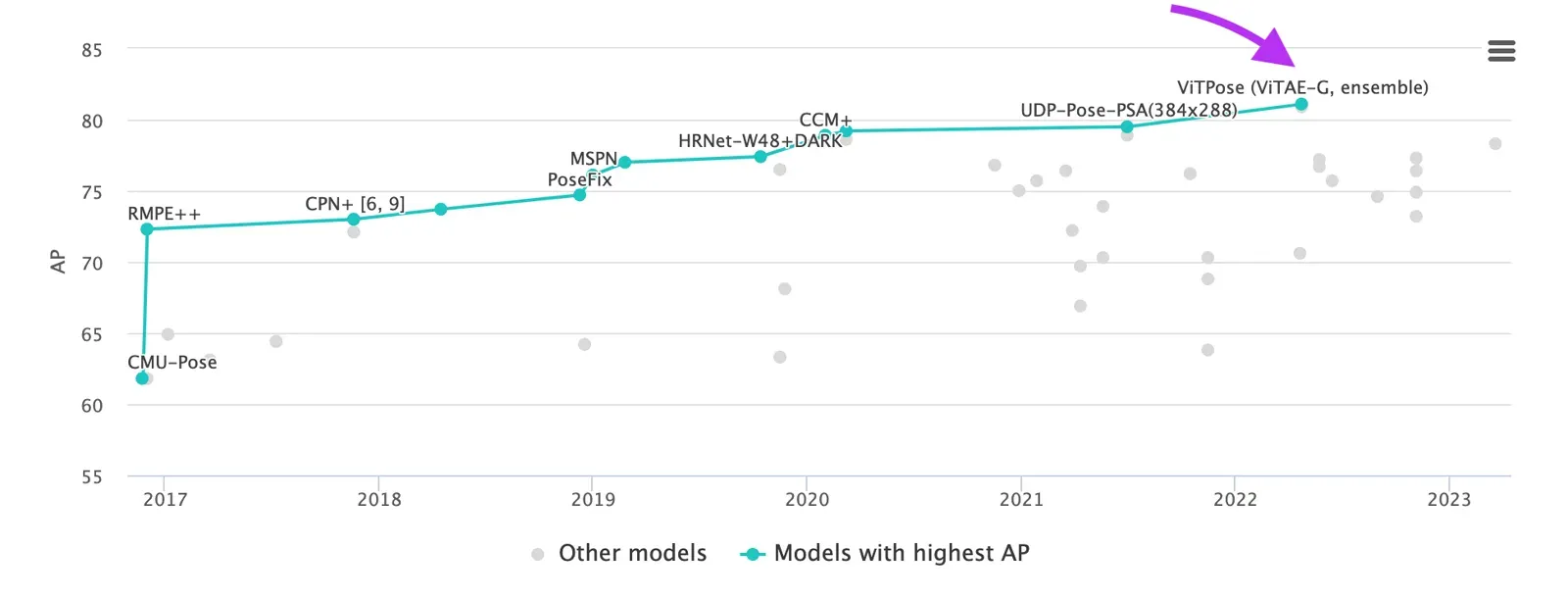 ViTPose model is number one in Pose Estimation Leaderboard on MS COCO Keypoint test-dev and obtains 81.1 AP.
The VitPose architecture builds upon the foundation of plain vision transformers. Its backbone, the encoder, relies on non-hierarchical vision transformers to extract image features. VitPose incorporates a lightweight decoder for pose estimation. This model strikes a favorable balance between inference speed (throughput) and performance (accuracy) by harnessing the scalable model capacity and the high parallelism inherent in transformer-based approaches.
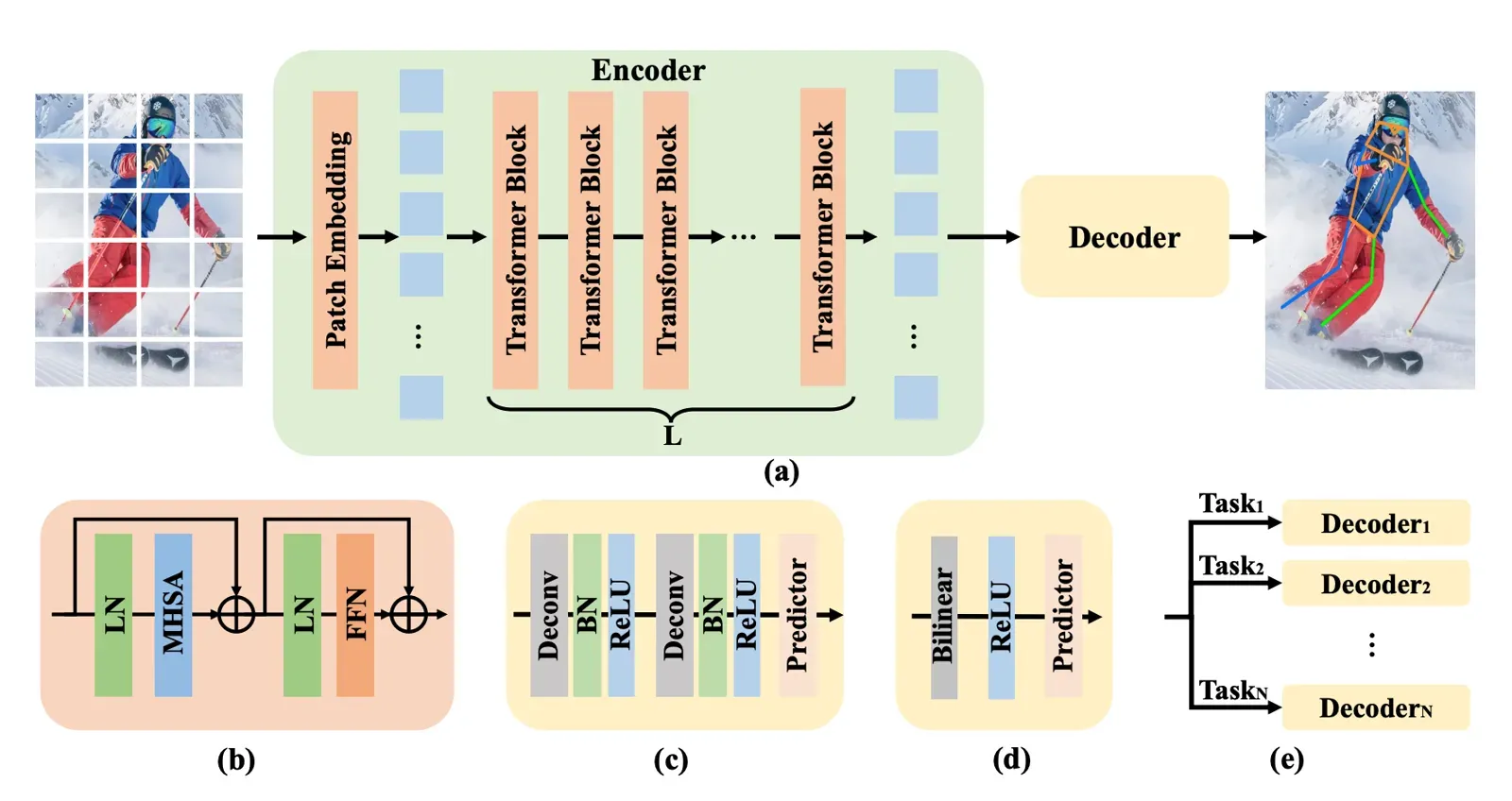 (a) The framework of ViTPose. (b) The transformer block. (c) The classic decoder. (d) The simple decoder. (e) The decoders for multiple datasets.
Thus, ViTPose authors keep the structure as simple as possible and try to avoid fancy but complex modules, even though they may improve performance. To this end, authors simply append several decoder layers after the transformer backbone to estimate the heatmaps w.r.t. the keypoints, as illustrated in the accompanying figure. For simplicity, they do not adopt skip-connections or cross-attentions in the decoder layers but simple deconvolution layers and a prediction layer.
Specifically, given a person instance image X as input, ViTPose first embeds the images into tokens via a patch embedding layer. Subsequently, the embedded tokens are processed by several transformer layers, each of which is consisted of a multi-head self-attention (MHSA) layer and a feed-forward network (FFN).
The paper lists model sizes from about 100M to 1B parameters. ViTPose has several notable attributes:
-
Structure simplicity: it maintains a straightforward architecture by leveraging plain vision transformers, avoiding the integration of complex modules.
-
Scalability: ViTPose permits the adjustment of model size by stacking different numbers of transformer layers and manipulating feature dimensions as needed.
-
Flexibility: the model demonstrates adaptability in various aspects, including pre-training data sources, resolution, attention types, and fine-tuning . It can effectively undergo pre-training on datasets lacking pose data and subsequently fine-tune on pose estimation datasets.
-
Transferability: ViTPose uses knowledge distillation to train large models and enhance the performance of smaller ones by transferring knowledge from the larger models.
How do you connect your GPU? (Step 1)
In Supervisely it is easy to connect your own GPU to the platform and then use it to run any neural networks on it for free. To connect your computer with GPU, please watch these videos for MacOS, Ubuntu, any Unix OS or Windows.
How do you deploy the ViTPose model? (Step 2)

Run Serve ViTPose app on your computer, select one of the pre-trained checkpoints and press Deploy button.
The model is integrated into Supervisely with the following 11 pre-trained checkpoints for humans and four-leg animals (AP is on COCO for human models and on AP-10K for animal models; the human numbers match the ViTPose repo). Within Supervisely, users have the flexibility to choose and deploy any of these available models as per their specific requirements.
| Model | Size | Pretrained | Resolution | AP | AR |
|---|---|---|---|---|---|
| ViTPose small classic for human pose estimation | 93 MB | COCO | 256x192 | 73.8 | 79.2 |
| ViTPose base classic for human pose estimation | 343 MB | COCO | 256x192 | 75.8 | 81.1 |
| ViTPose large classic for human pose estimation | 1.15 GB | COCO | 256x192 | 78.3 | 83.5 |
| ViTPose huge classic for human pose estimation | 2.37 GB | COCO | 256x192 | 79.1 | 84.1 |
| ViTPose base simple for human pose estimation | 328 MB | COCO | 256x192 | 75.5 | 80.9 |
| ViTPose large simple for human pose estimation | 1.13 GB | COCO | 256x192 | 78.2 | 83.4 |
| ViTPose huge simple for human pose estimation | 2.35 GB | COCO | 256x192 | 78.9 | 84.0 |
| ViTPose+ small for animal pose estimation | 177 MB | AP10K | 256x192 | 71.4 | - |
| ViTPose+ base for animal pose estimation | 559 MB | AP10K | 256x192 | 74.5 | - |
| ViTPose+ large for animal pose estimation | 1.72 GB | AP10K | 256x192 | 80.4 | - |
| ViTPose+ huge for animal pose estimation | 3.47 GB | AP10K | 256x192 | 82.4 | - |
ViTPose model can detect body joints for most of the four-legs animal species including alouatta, antelope, beaver, bison, bear, bobcat, buffalo, cat, cheetah, chimpanzee, cow, deer, dog, elephant, fox, giraffe, gorilla, hamster, hippo, horse, jaguar, leopard, lion, marmot, monkey, moose, mouse, otter,panda, panther, pig, rabbit, raccoon, rat, rhino, sheep, skunk, snow_leopard, squirrel, tiger, uakari, weasel, wolf and zebra.
How do you use ViTPose in the labeling toolbox? (Step 3)

NN Image Labeling
Use deployed neural network in labeling interface
Run this Inference App directly within the labeling tool and connect to your deployed model from the Step 2 above. Simply put a bounding box around an object or choose an existing one and press Apply model to ROI button. The selected object will be automatically cropped from the image and transmitted to the model, with real-time predictions displayed on the screen for your convenience.
By leveraging the keypoints predicted by the model, you can effectively streamline the manual annotation process, reducing the need for extensive manual labor. Your primary task will involve reviewing and correcting any inaccuracies or errors detected by the model.
How do you run ViTPose on all images in your dataset? (Step 4)

Apply Detection and Pose Estimation Models to Images Project
Label project images using detector and pose estimator
Serve YOLOv8 | v9 | v10 | v11
Deploy YOLOv8 | v9 | v10 | v11 as REST API service
VitPose model lacks the capacity to simultaneously detect multiple skeletons within a single image out-of-the-box. To address this limitation, it should be used alongside an object detection model. Here's the workflow: firstly, the object detection model identifies and predicts bounding boxes around all objects in the image. Then, the VitPose model is applied to each of these bounding boxes to predict keypoint skeletons. This collaborative approach ensures accurate skeleton detection for multiple objects within a single image.
In addition to the ViTPose model already deployed, you'll need to set up one of the object detection models. You have the option to either use a pre-trained model or a custom checkpoint. In Supervisely, we've integrated the leading object detection toolboxes, including YOLOv5, YOLOv8, MMDetection and Detectron2. You have the freedom to select any model from these toolboxes.
Moreover, you can effortlessly train your own custom object detection models without the need for coding. Explore our tutorial on how to train custom YOLOv8 model on your dataset.
ViTPose vs other pose estimation models: when to use which?
Use ViTPose when accuracy and pre-labeling quality matter most. For real-time work on a CPU, RTMPose-m reports 75.8 AP at 90+ FPS on an Intel i7-11700 (paper). For a single model that detects and estimates pose, try a YOLO pose model. The full comparison table is in Pose Estimation Models.
Supervisely runs in the cloud or on-premise. More in the Graph (Keypoints) tool docs.
Conclusion
This tutorial offers a smart way to avoid the time-consuming and expensive process of manually labeling body poses in computer vision tasks for both humans and animals. It shows how to use the advanced ViTPose model along with Supervisely to quickly pre-label pose skeletons in your custom image datasets. From creating templates and manual labeling to deploying ViTPose and integrating object detection, this tutorial simplifies the process. ViTPose's user-friendly features make it an excellent choice for speeding up annotation tasks of pose estimation of humans and animals on images. Sign up and try to reproduce this tutorial in our free Community Edition.
Frequently asked questions
What is ViTPose?
ViTPose is a pose estimation model that uses a plain, non-hierarchical vision transformer as the backbone and a lightweight decoder to predict keypoints. It was published at NeurIPS 2022, and its model sizes range from about 100M to 1B parameters.
How accurate is ViTPose?
The ViTPose paper reports 81.1 AP on the MS COCO keypoint test-dev set for its largest model. On COCO val at 256x192, the authors report 75.8 AP for ViTPose-B, 78.3 for ViTPose-L and 79.1 for ViTPose-H.
Can ViTPose detect several people in one image?
Not by itself. ViTPose needs a bounding box around each object. Use an object detector such as YOLOv8 to find the people or animals first, then run ViTPose on every box. The Apply Detection and Pose Estimation Models app does both in one run.
Does ViTPose work on animals?
Yes, with the ViTPose+ checkpoints trained on AP-10K. They cover many four-legged species. In Supervisely, four ViTPose+ animal checkpoints are available, with 71.4 to 82.4 AP on AP-10K.
Do I need my own GPU to run ViTPose in Supervisely?
You need a computer with a GPU connected to your Supervisely account to run the model. Connecting it takes a few minutes, and you can connect several machines.
Which pose estimation model should I use instead of ViTPose?
For speed on CPU or edge devices look at RTMPose. For one model that does detection and pose, look at YOLO pose models. See the comparison table in our pose estimation models guide.